Daily and Monthly Financials

Client Challenge

The client needed a faster and more accurate way to track daily services, retail sales, employee performance, and monthly commission calculations without manually consolidating multiple spreadsheets.

Overview & Key Features

An Excel financial tracking solution that automates daily sales reporting, monthly financial consolidation, and employee commission calculations. This system provides real-time visibility into service performance, retail sales, and individual employee contributions while automating monthly file management.

Core Functionalities:

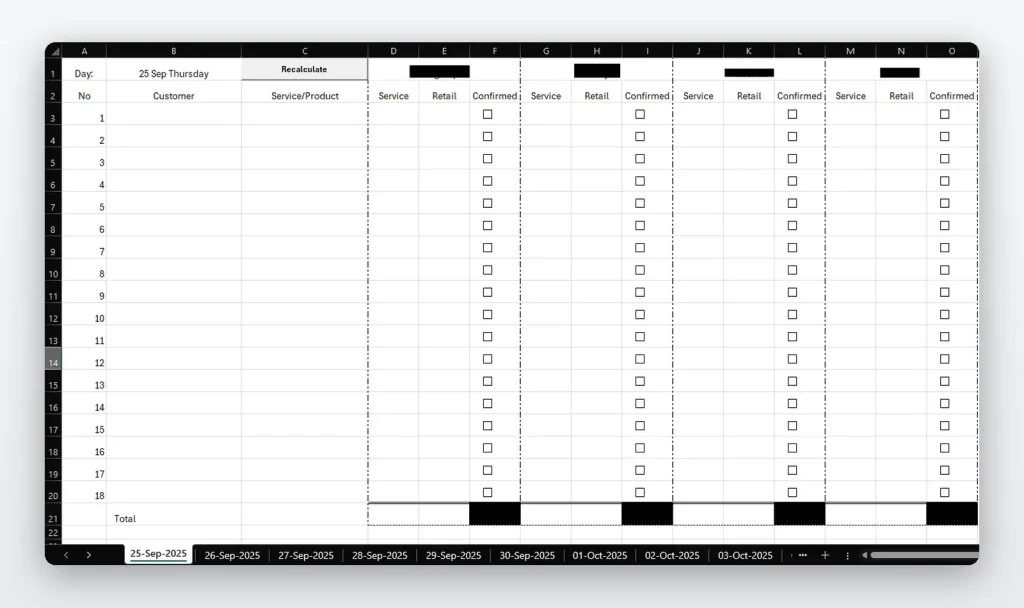
  • Daily Financial Tracking: Employee columns × customer rows matrix for detailed daily service and sales tracking
  • Automated Service Calculations: Automatic totaling of service amounts and retail values with real-time recalculation
  • Sales Confirmation System: Built-in verification for confirmed services and retail products sold
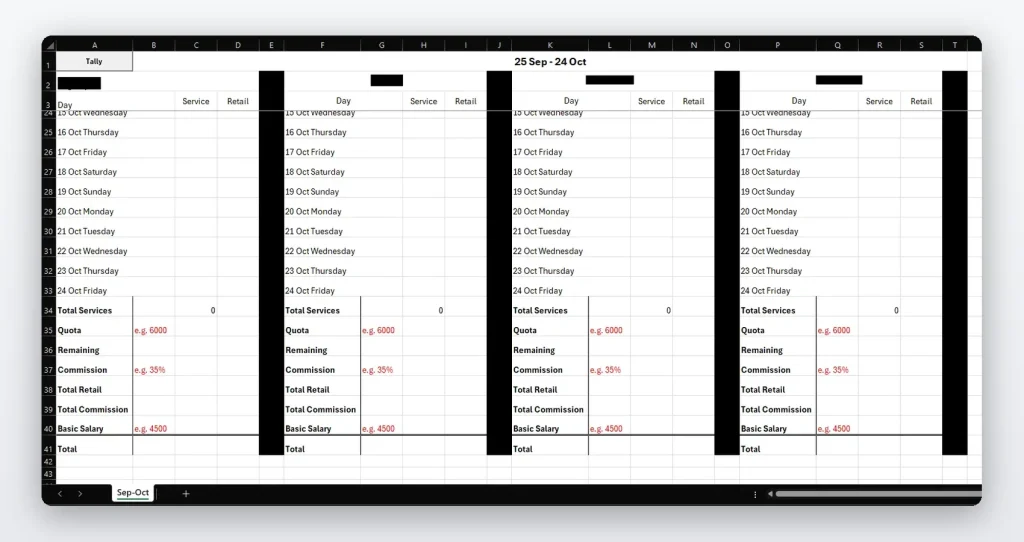
  • Monthly Financial Consolidation: Seamless daily-to-monthly data aggregation with automated period transitions
  • Comprehensive Commission Engine: Calculates total services, retail sales, commission amounts, and combined employee CTC
  • Custom Employee Parameters: User-input fields for quotas, commission rates, and basic salaries per employee
  • Automated File Management: Creates new monthly folders and files automatically at period end
  • Performance Analytics: Tracks employee performance against quotas and targets
  • Data Integrity: Maintains accurate financial records across daily and monthly views

Skills & Technologies Used

Excel VBA
Financial Modeling
Array Formulas
Cross-Sheet References
Automated File Management
Commission Calculations
Data Consolidation
Folder Automation
Financial Reporting

FAQs

How are employee commissions calculated?

The system uses custom employee settings such as quota, commission rate, service totals, retail sales, and basic salary to calculate the final commission and combined CTC.

How does daily data move into monthly reports?

Daily sales data is recorded in the daily sheet and automatically consolidated into monthly summaries using VBA, cross-sheet references, and structured reporting logic.

How does automated file management work?

At month-end, VBA looks at the date and month of the year and creates new folders and files automatically, helping keep financial records organized by month and reducing manual admin work.

What should be considered when building commission tools?

Important items include commission rules, quotas, employee salary structures, service categories, retail product tracking, date periods, reporting format, and validation checks.

Solution

Excel VBA financial tracking system that records daily sales, calculates service and retail totals, tracks employee performance, calculates commissions, and automatically consolidates monthly financial data.

Who It’s For

This solution is for service-based businesses that need to track daily sales, employee targets, commissions, and monthly financial reports in Excel.