Inventory Management

Client Challenge

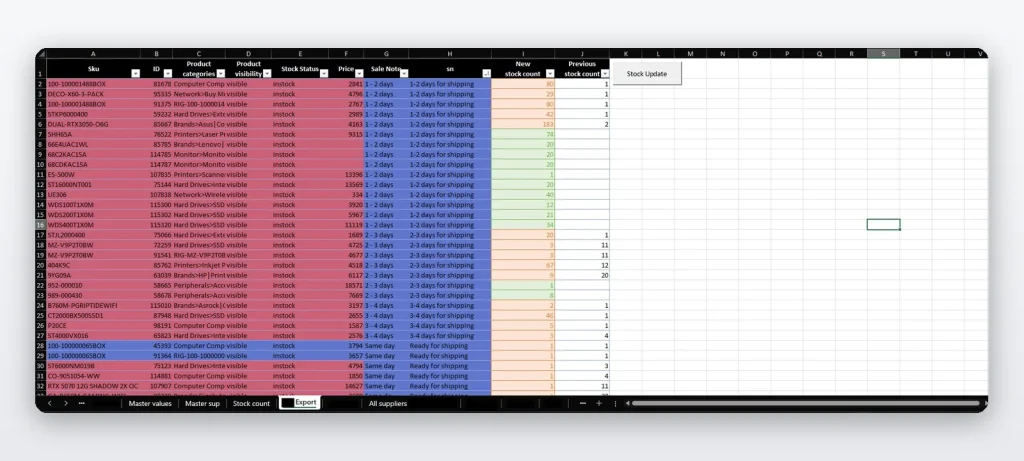
The client needed to update stock, backorders, shipping details, and warehouse quantities without manually editing large inventory files or risking upload errors.

Overview & Key Features

An inventory management system that automates stock tracking and seamlessly integrates with internal systems. This solution handles real-time inventory updates, shipping documentation, and prepares files for system uploads, significantly reducing manual data entry and improving accuracy.

Core Functionalities:

  • Automatically updates stock availability, backorders, and restocking timelines
  • Tracks and updates stock quantities across multiple warehouses and locations
  • Generates and updates shipping notes, tracking information, and delivery schedules
  • Handles bulk updates for large inventory changes efficiently
  • Includes data validation to prevent upload errors and system rejections

Skills & Technologies Used

Inventory Management
System Integration
Data Automation
Excel VBA
File Processing
Shipping Documentation
Stock Tracking
Batch Processing
Data Validation

FAQs

What is batch processing?

Batch processing means handling many records at once instead of one by one. In inventory systems, this is useful for updating thousands of stock items, prices, or warehouse quantities quickly.

What is system integration in Excel?

System integration in Excel means preparing, importing, or exporting data so it can work with another platform, such as an ERP, ecommerce store, warehouse system, or internal database.

Solution

An inventory automation system that updates stock availability, warehouse quantities, backorders, shipping information, and system upload files with validation to reduce mistakes.

Who It’s For

This solution is for businesses that manage stock across warehouses, process bulk inventory updates, or need clean files prepared for internal system uploads.