
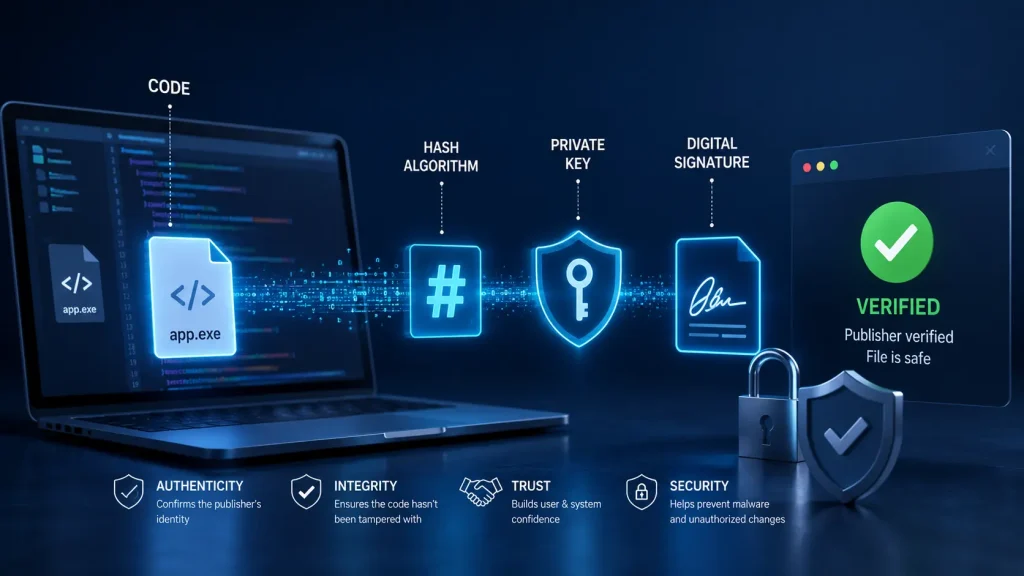
When you download software from the internet, how do you know that it hasn’t been modified by hackers? The answer is code signing.
Code signing is one of the most important security technologies used in modern software development, whether you’re downloading drivers, desktop applications, installers, PowerShell scripts, or enterprise software, code signing helps ensure that the software is authentic and hasn’t been tampered with.
In this guide, we’ll explain exactly how code signing works and why it’s important.
What is code signing?
Code signing is a security process that uses digital certificates and cryptographic signatures to verify:
- The identity of the software publisher
- That the software has not been modified since it was signed
- That users can trust where the software originated
Think of it like a wax seal on an important envelope, If the seal is intact, you know the letter hasn’t been opened, If the seal is broken, you immediately know something has changed.
Code signing works the same way—but with advanced cryptography instead of wax.
Why code signing exists
Without code signing, anyone could:
- Modify software
- Inject malware
- Replace installers
- Distribute fake updates
- Pretend to be another software company
Even if the software originally came from a trusted developer, there would be no reliable way to verify that the downloaded file is still the original.
Code signing solves this problem.
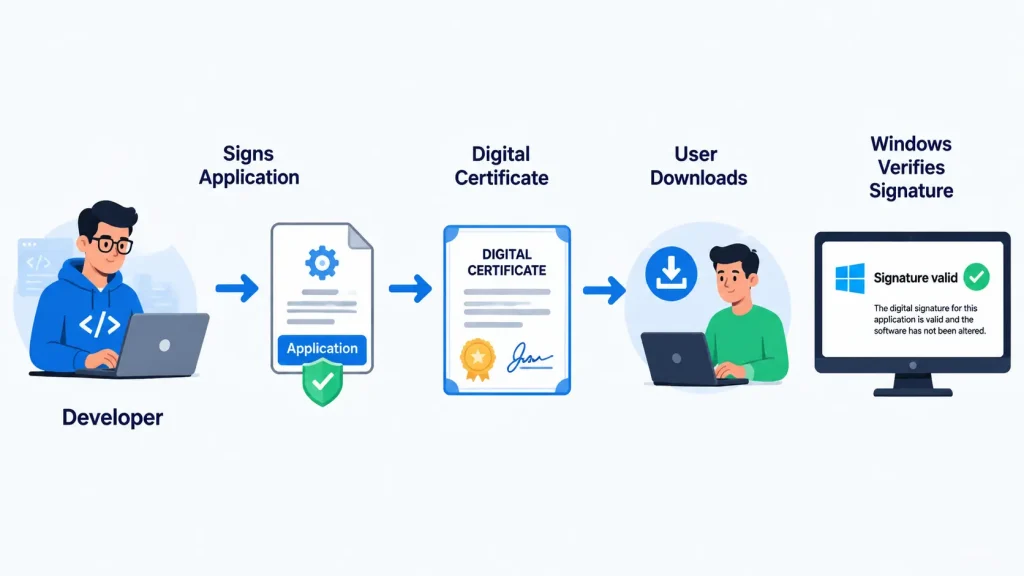
What happens when you sign software?
Here’s the simplified process.
Step 1 – The Software is Finished
A developer builds an application.
Examples include:
- Windows EXE
- MSI installer
- DLL
- SYS driver
- PowerShell script
- ClickOnce application
- CAB files
At this stage, nothing proves who created it.
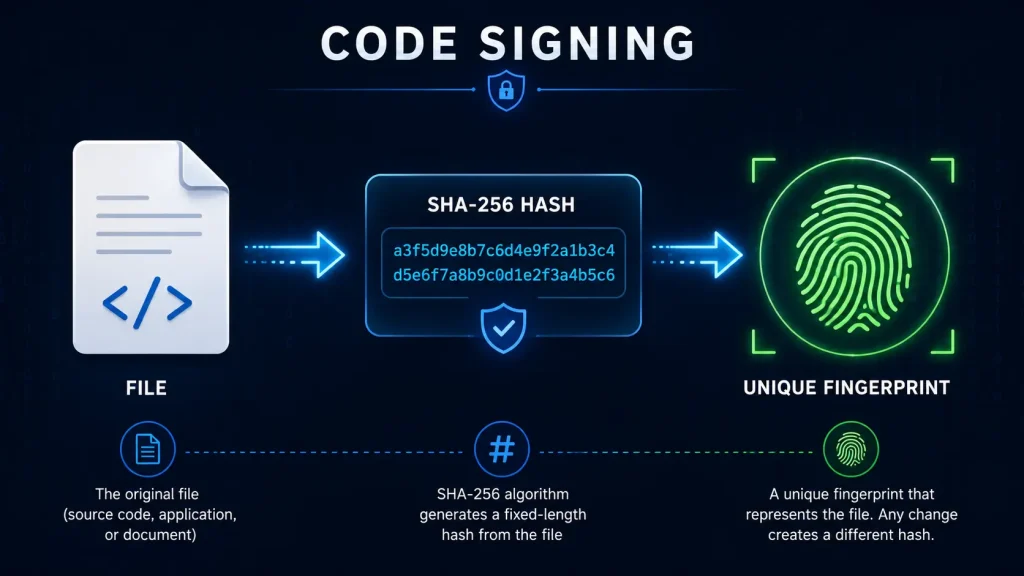
Step 2 – A Hash is Created
Before signing begins, a mathematical fingerprint called a hash is generated and this hash uniquely represents the file, for example:
Original File
↓

SHA-256 Hash

4D9A82F1A7B...
Even changing a single pixel in an icon completely changes the hash.
This is what makes hashes so powerful.
Step 3 – The Certificate Signs the Hash
Instead of encrypting the entire application, the signing certificate encrypts only the hash using the publisher’s private key.
The result becomes the digital signature.
This signature is embedded into the executable.
Step 4 – Distribution
The signed application is uploaded to:
- Company website
- Microsoft Store
- USB drive
- Enterprise software deployment
- Download portal
The signature travels with the file.
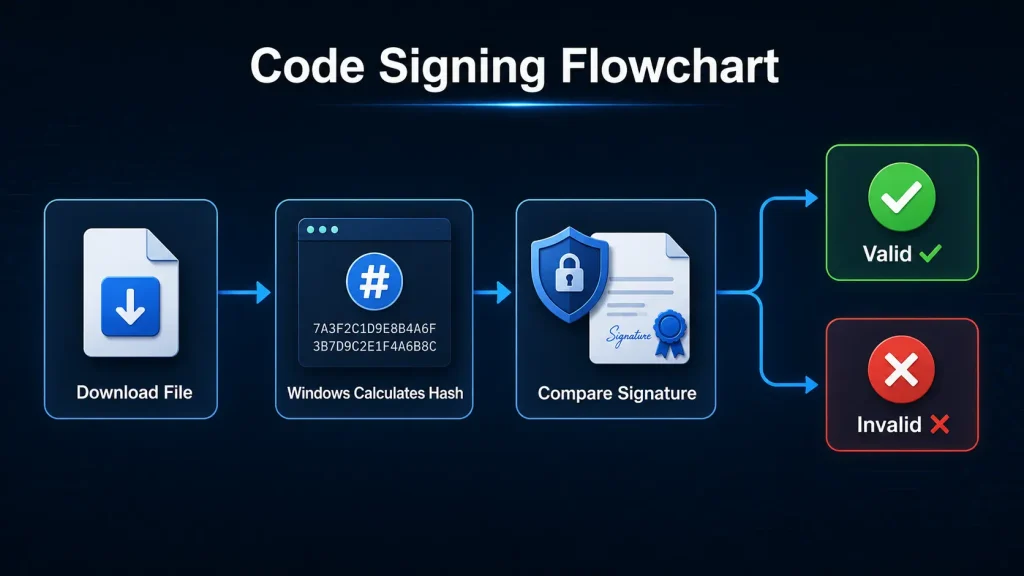
Step 5 – Verification
When someone downloads the application:
Windows:
- Reads the certificate
- Recalculates the file hash
- Decrypts the signature
- Compares both hashes
If they match:
✅ The file has not changed.
If they don’t:
❌ Windows warns the user that the file may have been modified.
Understanding public key cryptography
Code signing relies on public key cryptography.
Every certificate contains two keys:
Private Key
The private key:
- Never leaves the owner
- Signs software
- Must be protected
If someone steals the private key, they can impersonate the publisher.
Public Key
The public key:
- Is distributed with the certificate
- Verifies signatures
- Cannot be used to sign software
Anyone can use the public key to verify software authenticity.
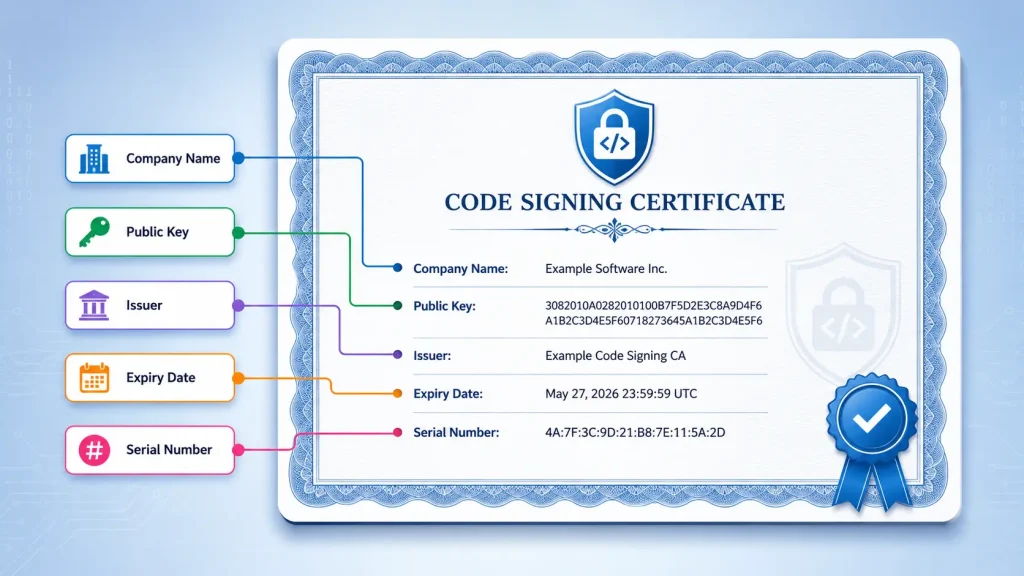
What is a code signing certificate?
A code signing certificate is issued by a trusted Certificate Authority (CA).
Examples of CA’s include:
Before issuing the certificate, the CA verifies the identity of the applicant.
The certificate contains:
- Company name
- Public key
- Expiration date
- Issuing authority
- Certificate serial number
What is a Certificate Authority?
A Certificate Authority (CA) is an organization trusted by operating systems and browsers to verify identities before issuing digital certificates.
Instead of every computer trusting every software developer directly, computers trust a small number of well-known Certificate Authorities. Those authorities verify the identity of publishers before issuing code signing certificates.
This trust model allows Windows and other operating systems to verify software publishers automatically.
What happens if someone modifies the file?
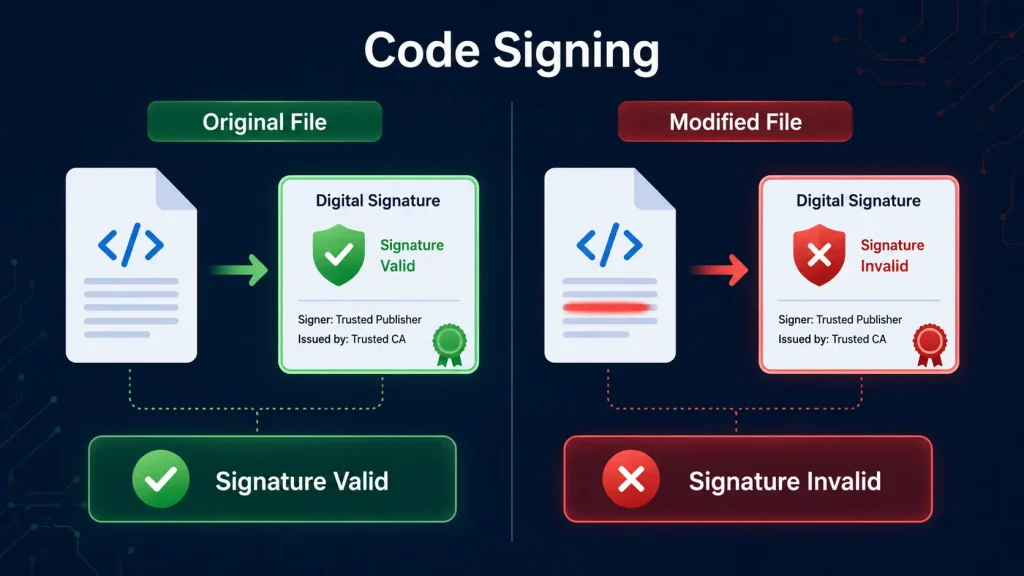
Imagine someone downloads your installer and secretly inserts malware before uploading it elsewhere.
Although the modified installer may still look identical, even a tiny change causes the file’s hash to change.
During verification:
- Windows calculates a new hash.
- The stored digital signature contains the original hash.
- The two values no longer match.
- Verification fails.
This is how code signing helps detect tampering.
What is timestamping?
Certificates eventually expire.
Without timestamping:
- Software signed before certificate expiry could appear invalid after the certificate expires.
Timestamping solves this issue.
When software is signed, a trusted timestamp server records the exact signing time.
As long as the certificate was valid when the software was signed, the signature can remain valid even after the certificate itself expires.
Timestamping is considered a best practice.
Standard vs EV code signing certificates
There are two main types of code signing certificates.
Standard Code Signing
Suitable for:
- Independent developers
- Small businesses
- Internal software
- Utilities
- Business applications
Advantages:
- Lower cost
- Easier issuance
- Strong protection
Extended Validation (EV) Code Signing
EV certificates require more rigorous identity verification.
Benefits include:
- Stronger identity assurance
- Private keys typically stored in secure hardware or approved hardware-backed environments
- Often preferred for higher-security environments and enterprise software distribution
Organizations distributing widely used commercial software may choose EV certificates for the additional assurance they provide.
What types of files can be signed?
Many file types support code signing, including:
- EXE
- MSI
- DLL
- SYS
- CAB
- PowerShell scripts
- Visual Studio ClickOnce deployments
- Windows installers
- Drivers
Common misconceptions about code signing
“Code signing encrypts my software.”
False.
Only the digital signature is created using cryptographic techniques. The application itself remains readable and executable.
“Code signing prevents malware.”
Not exactly.
Code signing does not prevent someone from writing malicious software. It verifies the publisher’s identity and helps detect whether software has been altered after signing.
“Once signed, a file can never change.”
Incorrect.
A signed file can still be modified.
However, any modification invalidates the signature, making tampering detectable.
Best Practices for Developers
To maximize security:
- Protect private keys carefully.
- Use secure hardware-backed key storage where appropriate.
- Always timestamp signatures.
- Rotate certificates before expiration.
- Never share signing credentials.
- Sign every production release.
- Verify signatures before publishing software.
Why businesses should care about code signing
Whether you’re developing:
- Desktop software
- Internal enterprise tools
- Automation software
- Device drivers
- Customer applications
Code signing helps:
- Protect your reputation
- Demonstrate software authenticity
- Detect tampering
- Build user confidence
- Support secure software distribution
For organizations distributing software to employees or customers, code signing is an essential part of a secure software development lifecycle.
Practical workflow
Below is a practical workflow from when the user requests the software to the point of the user using the software.
┌──────────────────┐
    1. Client Requests Software
└──────────────────┘
              │
             ▼

Example:

"I need inventory management software
for my warehouse."

              │
             ▼

┌───────────────────┐
    2. Developer Builds Software
└───────────────────┘

The developer:

• Designs the application
• Writes the code
• Compiles the project

Output:

inventory-manager.exe

At this stage the executable is
NOT yet trusted or signed.

              │
             ▼

┌───────────────────┐
    3. Developer Runs signtool
                        ─────
     sign inventory-manager.exe
└───────────────────┘

From this point onward, MOST of the work
happens automatically in the background.

────────────────────────────────────────────────────────────

SIGN TOOL PROCESS:

✓ Creates hash (digital fingerprint)
✓ Loads certificate (contains company identity & public key)
✓ Accesses private key securely and encrypts the hash (inside USB hardware token, HSM, Cloud service)
✓ Signing information is embedded into the executable


 inventory-manager.exe now contains:

│ Application Code
│ Resources
│ Icons
│ DLL References
│────────────────
│ Digital Signature
│ Publisher Certificate
│ Timestamp


The application itself has not changed—
only signing information has been added.

              │
             ▼

Developer distributes the software

Website, Email, USB, Microsoft Intune, Software Portal, Microsoft Store

──────────────────────────
          USER DOWNLOADS SOFTWARE
──────────────────────────

              │
             ▼

┌──────────────────┐
    4. Windows Opens the File
└──────────────────┘

WINDOWS SECURITY PROCESS:

✓ Reads embedded Certificate
✓ Reads Digital Signature
✓ Reads Timestamp
✓ Recalculates a NEW SHA-256 hash from the downloaded executable. (This produces a fresh fingerprint.)
✓ Uses PUBLIC KEY to verify the signature (verifies signature authenticity)
✓ Compares Original Hash VS New Hash


              │
             ▼

        Do they match?

         ┌──────────────────┐

      YES                                                        NO
         │                                                            │
        ▼                                                          ▼
 Signature Valid                         Signature Invalid
         │                                                            │
        ▼                                                          ▼
✓ Publisher verified                   ✗ File modified
✓ File unchanged                        ✗ Signature broken
✓ Software authentic                ✗ Hash mismatch
✓ Integrity confirmed                ✗ Possible corruption or malware
         │                                                            │
        ▼                                                          ▼
User installs                                 Windows displays
and runs the                                  a security warning
software safely                           or blocks execution
Conclusion
Code signing is a fundamental technology that helps establish trust in software distribution.
By combining digital certificates, cryptographic signatures, and trusted Certificate Authorities, code signing enables users and operating systems to verify both the identity of the publisher and the integrity of the software.
Whether you’re a solo developer or a large organization, implementing proper code signing practices protects your users, strengthens your brand, and supports a more secure software ecosystem.
If you’re planning to distribute Windows applications, installers, scripts, or drivers, code signing should be an integral part of your development and release process.

Leave a Reply