
Automation has become essential for anyone working with spreadsheets, reports, data cleaning, finance models, dashboards, or repetitive business processes, and it increasingly touches everyday workflows across diverse teams and industries, from finance and sales to operations and analytics globally today.
For instance, the phrase “Excel VBA vs Python” is one of the most common phrases, because teams weigh familiarity, speed, reliability, security, and how well each tool integrates with existing data sources and software ecosystems across organizations globally today as well.
Both can save hours of manual work and both can automate Excel. But they are not the same tool, and choosing the wrong one can create unnecessary complexity.
In this guide, we’ll compare Excel VBA vs Python automation.
Additionally, it explains where each performs best to help you decide which is right for your workflow.
What Is Excel VBA?
VBA, short for Visual Basic for Applications, is Microsoft’s built-in programming language for automating tasks inside Excel and other Office applications.
With VBA, users can create macros that perform actions such as:
- Formatting worksheets
- Creating reports
- Cleaning spreadsheet data
- Automating calculations
- Generating charts
- Sending emails through Outlook
- Building Excel-based forms and tools
VBA is deeply integrated into Excel, which makes it very useful for automating spreadsheet-based workflows.
For example, a finance analyst might use VBA to refresh monthly reports, format worksheets, copy data between tabs, and export a final workbook as a PDF.
What Is Python Automation?
Python automation uses the Python programming language to automate tasks across files, systems, websites, APIs, databases, and applications.
Several libraries exist for Python to work with Excel such as:
- pandas
- openpyxl
- xlwings
- xlsxwriter
- pywin32
Python automation can handle tasks such as:
- Reading and writing Excel files
- Cleaning large datasets
- Connecting to APIs
- Scraping or collecting web data
- Automating reports
- Running machine learning workflows
- Integrating databases
- Sending automated emails
- Scheduling recurring scripts
Python is not limited to Excel and that is one of its biggest advantages.
Quick Comparison
| Feature | Excel VBA | Python Automation |
| Best for | Excel-specific tasks | Data, systems, APIs, scalable automation |
| Learning curve | Easier for Excel users | Moderate, especially for non-coders |
| Excel integration | Excellent | Very good with libraries |
| Data processing | Good for smaller datasets | Excellent for large datasets |
| Scalability | Limited | Strong |
| Cross-platform use | Mostly Windows/Excel dependent | Works across platforms |
| API integration | Possible but clunky | Excellent |
| Automation outside Excel | Limited | Excellent |
| Best user type | Excel power users | Analysts, developers, data teams |
| Long-term flexibility | Moderate | High |
When Excel VBA Is the Better Choice
Excel VBA is still highly useful, especially when the task lives almost entirely inside Excel.
1. You Work Mainly Inside Excel
If your workflow involves opening a workbook, clicking buttons, formatting sheets, updating formulas, and exporting reports, VBA may be the simplest solution.
VBA works directly with Excel objects such as:
- Workbooks
- Worksheets
- Ranges
- Cells
- Pivot tables
- Charts
- UserForms
Because it is built into Excel, VBA can manipulate almost every part of a workbook.
2. You Need Simple Macros for Repetitive Tasks
VBA is excellent for recording or writing macros that repeat manual Excel actions.
Common examples include:
- Formatting monthly reports
- Hiding or deleting columns
- Copying data between sheets
- Refreshing pivot tables
- Applying formulas
- Creating buttons inside Excel
If the task is simple and Excel-based, VBA is often faster to implement than Python.
3. Your Team Already Uses Excel Macros
Many companies have years of Excel files with existing VBA macros. If your team already depends on macro-enabled workbooks, continuing with VBA can be practical.
VBA is also easier to share with Excel users who do not want to install Python or manage external scripts.
4. You Need Excel UI Automation
VBA is strong when you need buttons, forms, and workbook-level user interaction.
For example, you can create:
- A button that generates a report
- A form for users to enter inputs
- A macro-enabled template
- A guided workflow inside Excel
Python can do some of this, but VBA is usually more natural for Excel-native interfaces.
When Python Automation Is the Better Choice

Python is usually the better option when the automation goes beyond basic spreadsheet manipulation.
1. You Work With Large or Complex Data
Python is much better for handling large datasets, especially when using pandas.
Excel can slow down with large files. VBA can also become inefficient when processing thousands or millions of rows.
Python is better suited for:
- Large CSV files
- Multiple Excel files
- Database exports
- Complex transformations
- Data validation
- Automated data pipelines
If your workflow involves serious data processing, Python is usually the stronger choice.
2. You Need to Connect to APIs or Databases
Python makes it much easier to connect Excel workflows with external systems.
For example, Python can pull data from:
- REST APIs
- SQL databases
- Cloud platforms
- CRM systems
- Accounting software
- Web services
VBA can connect to APIs, but the process is often more difficult and less elegant.
Python has mature libraries for web requests, authentication, JSON processing, database connections, and scheduling.
3. You Want Scalable Automation
Python is better for automation that needs to grow over time.
For example, a Python script can:
- Pull data from an API
- Clean and transform the data
- Save outputs to Excel
- Email reports
- Upload files to cloud storage
- Run every morning on a schedule
This kind of workflow is possible with VBA, but Python is usually more reliable and maintainable for larger automation systems.
4. You Need Cross-Platform Flexibility
VBA is closely tied to Microsoft Office, especially Excel on Windows.
Python can run on:
- Windows
- macOS
- Linux
- Servers
- Cloud environments
- Containers
If you want automation that is not dependent on someone opening Excel, Python is the better choice.
Excel VBA Strengths
Excel VBA remains popular because it is convenient and deeply integrated into Excel.
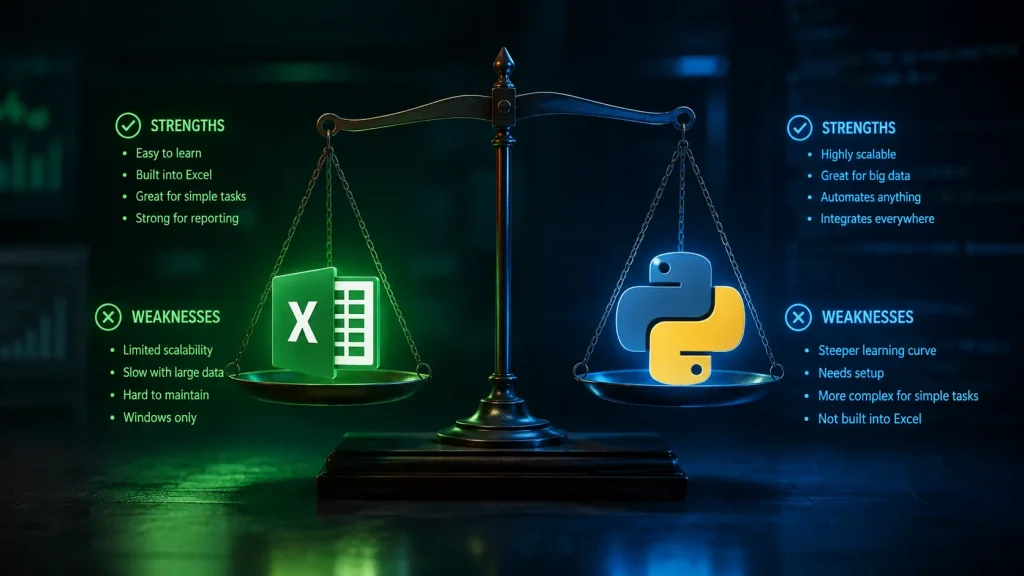
Key strengths include:
- Built directly into Excel
- Great for automating spreadsheet tasks
- Easy macro recording
- Strong control over Excel formatting and layout
- Useful for buttons, forms, and templates
- No separate programming environment required
- Familiar to many finance and operations teams
For Excel-heavy teams, VBA can still be the fastest path to automation.
Excel VBA Weaknesses
VBA also has important limitations.
Common weaknesses include:
- Less suitable for large datasets
- Harder to maintain in complex projects
- Limited modern library ecosystem
- Weak compared with Python for APIs and data science
- Often tied to desktop Excel
- Version control can be difficult
- Macro security restrictions can create deployment issues
VBA is powerful inside Excel, but it becomes less attractive when automation expands beyond Excel.
Python Automation Strengths
Python has become one of the most popular languages for automation because it is flexible, readable, and supported by a huge ecosystem.
Key strengths include:
- Excellent for data processing
- Strong library ecosystem
- Works with APIs, databases, files, and web services
- Easier to scale into larger systems
- Better for machine learning and analytics
- Cross-platform compatibility
- Strong community support
- Better suited for cloud and server automation
If Excel is only one part of the workflow, Python is the better choice.
Python Automation Weaknesses
Python is not always the easiest choice.
Potential drawbacks include:
- Requires installation and environment setup
- Can be intimidating for non-technical Excel users
- Excel formatting can be more involved than with VBA
- Some tasks require third-party libraries
- Sharing scripts with non-technical users may require extra packaging
- Direct interaction with open Excel workbooks may need tools like xlwings or pywin32
Python is powerful, but it may be more than you need for simple Excel macros.

Excel VBA vs Python for Data Cleaning
For basic spreadsheet cleanup, VBA works well.
Examples:
- Remove blank rows
- Format headers
- Delete duplicates
- Standardize cell colors
- Apply formulas
However, Python is usually better for more advanced data cleaning.
Examples:
- Merge multiple files
- Clean inconsistent datasets
- Handle missing values
- Transform large tables
- Validate data rules
- Process millions of rows
For small Excel files, VBA is fine. For larger or more complex datasets, Python is usually better.
Excel VBA vs Python for Reporting
Both VBA and Python can automate reports.
VBA is ideal when the final report is an Excel workbook with formatting, pivot tables, and charts.
Python is ideal when the report requires data from multiple sources, advanced calculations, or automated distribution.
Use VBA for reporting if:
- The report is Excel-based
- Users need to interact with the workbook
- Formatting is very important
- Existing templates already use macros
Use Python for reporting if:
- Data comes from APIs or databases
- Reports need to be generated automatically
- Multiple file formats are involved
- The workflow should run without opening Excel
Excel VBA vs Python for Finance Teams
Finance teams often rely heavily on Excel, which makes VBA useful.
VBA is commonly used for:
- Budget templates
- Forecasting models
- Month-end reporting
- Financial dashboards
- Workbook consolidation
- Reconciliation tasks
However, Python is becoming increasingly valuable in finance because it can automate data pipelines, risk models, forecasting, and large-scale analysis.
A practical approach is to use both:
- VBA for Excel front-end tools
- Python for data extraction, transformation, and heavy processing
This hybrid model works well for many finance departments.
Excel VBA vs Python for Business Analysts
Business analysts often benefit from learning both, but Python usually offers more long-term value.
VBA is useful when analysts work in organizations where Excel macros are common. Python is more useful when analysts need to work with data from different systems.
For career growth, Python may provide a broader advantage because it applies to:
- Data analytics
- Business intelligence
- Automation
- APIs
- Machine learning
- Cloud workflows
VBA is still useful, but Python opens more doors outside Excel.
Final Verdict: Excel VBA or Python Automation?
Choose Excel VBA if your automation is simple, Excel-focused, and used by people who are already comfortable with macro-enabled workbooks.
Choose Python automation if your workflow involves large data, multiple systems, APIs, databases, or long-term scalability.
Therefore, for many professionals, the best answer is VBA and Python, not VBA or Python. Take a look at Microsoft’s article on Python in Excel as it explores enabling and using Python directly in-cell in your Excel worksheets.



Leave a Reply